


You're probably reading this because you are a small business owner who has recently grown and part of that growth is adding a few software solutions to save you some time and money. If I'm right, this is the perfect post for you. We will be reviewing the best free payroll software solutions in 2019 and 2020.
We will tackle a few different methods on finding the best payroll software for your small business. The payroll software for your friend may look a lot different than the best payroll software for you. Let's examine the pros and cons around features, integrations, flexibility and lastly...is it really free.

How to decide which payroll software is best?
Benefits of a payroll system
There are 4 major benefits to look at when deciding which payroll software is best for your small business.
- Minimize Errors. There are many complicated numbers to identify the proper taxes and liabilities when paying an employee. You can minimize the risk of those errors by using a payroll service. As mentioned earlier in this article, having an employee under or over paid can create a lot of frustration. You can avoid those terrible encounters by trusting a proven payroll software.
- Save Money. When using a software to run your payroll, you are automating a lot of work. You can keep yourself from outsourcing the payroll responsibilities to a book keeper or accountant. Their time will cost more than a software to process payroll for you.
- Save Time. Time is precious to small business owners. Not only the payroll cycle but the reporting and filing taxes can be quite burdensome. Many of the payroll services will have a dashboard for each employee to access former pay stubs and end of year tax documents. This often times is one of those time saving you forget until January when everyone is bugging you for important documents to file taxes.
- Flexibility. Small business owners love the flexibility of running a business. With that, you might feel strapped to be at your office every pay day. With a payroll software you can automate and process payroll from anywhere. Many of todays companies highly encourage all their employees to be on direct deposit for this very purpose. Give yourself the freedom to process payroll from anywhere at anytime.
Features to look for in your payroll software
When analyzing the best payroll software for your business, you'll want to chart out the features you think are most important to you. Many of us starting out are not sure what features we want vs we need. Here is a list of what features your payroll service should have available:
- Integrated w/ bookkeeping software
- tax tables subscription (Federal & State)
- print checks and stubs
- Print Federal tax forms
- Print State tax forms
- e-file Federal forms
- e-file State forms
- e-pay Federal taxes
- e-pay State taxes (for states that have the option)
direct deposit option - Paychecks & direct deposit
- 401(k) plan administration
- Pay garnishment
- Pay adjustments
- Paid time off tracking and reporting
- Automated tax updates
Insights and payroll reporting
Having the right data at your fingertips can help you run your business from a strategic mindset and not under emotional triggers. A good payroll provider will allow you to build reports to support key milestones and decision making. Look for dashboard or reports you can easily customize to your small business needs.
Data security
Your payroll information is going to be layered with personal and sensitive information. At the very least it will include, names, birthdates, social security numbers, salaries and enough information about tax information to commit a high number of fraud issues. It will be important to verify the companies liability to this data. What kind of protection you have if the data is compromised. Find out how the company is storing the data and if it's using their own data storage or outsourcing to a 3rd party data center.
Growth and scalability
If you're in an employee intensive business model with plans to grow or hire a high volume of employees, you'll want a provider who can handle you. Talk with them about the on-boarding process of new employees. How quick is it to add new employees, get them started with payroll.
What Is the Best Payroll Software for Small Business?
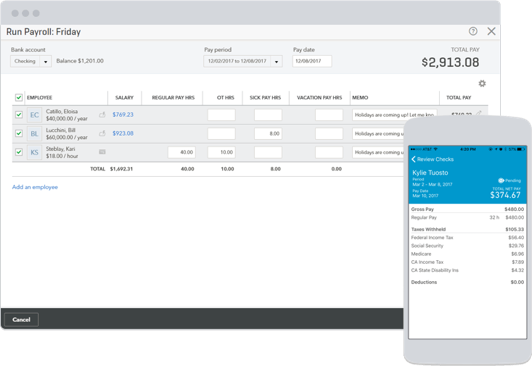
Intuit QuickBooks Payroll
Patriot Payroll
Not known for all the bells and whistles, but it is the best low-cost payroll software for small businesses.
Payroll4Free
If 100% free is your number one priority, this is the best free payroll software in the market. There is a limitation to 25 total employees.
The Perfect Payroll Process
Set up New Employees
Before running your first payroll, you'll want to ensure all the paperwork and information for the employee is accurate. If you're including benefits, have all your insurance plan, retirement and deductions explained to the employee. You should have federal and state tax withholdings documents as well.
Collect and Verify Timecard Information
For hourly employees, employers must collect and analyze information about hours worked. Ensure you have a process mapped out and trained each employee on the importance of this process.
Processing Payroll
The first step in processing payroll is to prepare a paycheck for each employee.
There are four major elements to understand when processing your payroll:
1. Gross Wages
The total amount your company pays each employee before any deductions, based on whether the employee is salaried or hourly. Deductions from employee pay can include insurance premiums, retirement plan contributions, benefits, and tax withholdings.
Many times we get confused between Gross Wages vs Net Pay. The amount of money your employees actually receive in their paychecks is called net pay.
2. Benefits
While businesses generally cover the cost of benefits, a portion of the total amount may come from your employees’ gross wages. This is viewed as an extra expense line on the employer if there are employer portion of benefits to be added.
3. Social Security and Medicare
Every w2 employee will have a Social Security and Medicare expense. You need to deduct Social Security and Medicare payments from your employees’ gross wages.
4. Tax Withholdings
Your company must withhold each employee’s share of federal and state income taxes from payroll. You need to calculate income taxes and forward payments to the appropriate government agency on a semi-weekly or monthly basis. One thing to consider here is if you are paying bi-weekly or semi- weekly, you'll be processing 26 payroll cycles in a year. If you are paying on a monthly basis (Ex. 1st and 15th of the month) you'll only have 24 payroll runs.
Issuing Paychecks
It is common to use ACH or direct deposit. Manual checks can still add more risk than reward.
We build hiring software for growing businesses and write about what we see working across 5,000+ of them. More from the blog
Keep reading
The question of how to make employees engage is commonly discussed in management meetings…
Read thisBrian Kristofek, President and CEO of Upshot, said, “Being a great place to work…
Read thisWhile some companies survive without a focus on culture, they will have to make…
Read thisStart hiring the smart way with AvaHR.
Post to every board in one click, score every applicant, and decide together. Trusted by 5,000+ growing businesses.