


Understanding how to file EEO-1 report is crucial for compliance and helps ensure your organization meets federal regulations effectively. Whether you're navigating this for the first time or need a refresher, we’re here to walk you through each step with clear, practical advice.
Plus, we’ll show you how using AvaHR can make the process smoother and more efficient for your human resources team.
In this guide, we’ll cover the filing process, data collection, and tips to make it as painless as possible.
We're going to guide you through this process with four easy steps:
- Collect Data With an ATS - AvaHR
- Organize by Job Category
- Prepare EEO-1 Report
- Submit Report to EEOC
Let’s dive in and make EEO-1 reporting a breeze!
Download Now: Free EEO-1 Report Checklist
Collect Using an ATS
One of the biggest challenges of filing an EEO-1 report is collecting the right workforce data. You’ll need to gather details such as race, ethnicity, gender, and job classification for both full-time and part-time employees.
This process can quickly become complex, especially for multi-establishment companies, local governments, or those with a dispersed workforce.
By using an ATS, like AvaHR, you can automate data collection from the start of the hiring process, ensuring that you have accurate and compliant records when it’s time to file.
An ATS simplifies this process by embedding EEO surveys directly into your hiring workflow. Candidates can self-identify during the application process, ensuring that the required demographic data is collected voluntarily and efficiently.
Not only does this save time, but it also minimizes the risk of errors or gaps in employment data, which could lead to reporting requirements complications down the line.
Step 1: Use AvaHR to Collect Employee Data
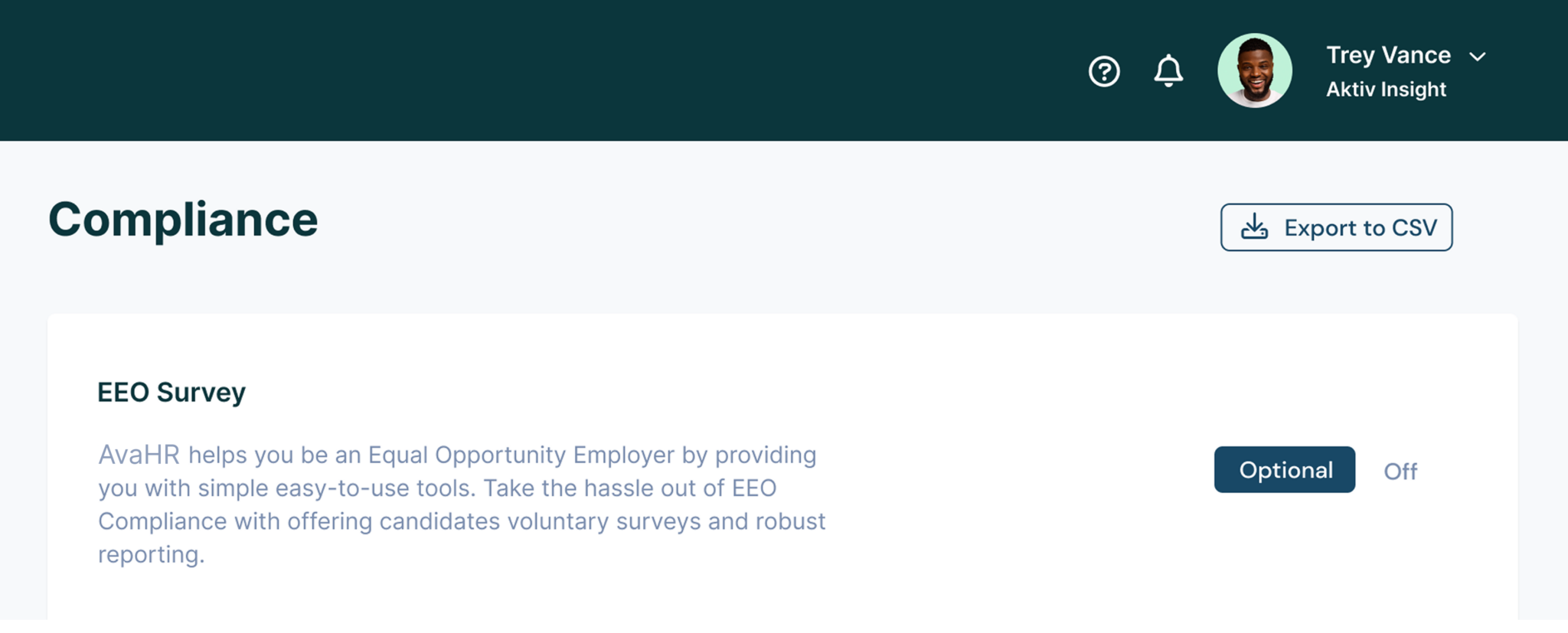
AvaHR takes this a step further by offering EEO compliance tools that make filing your report easier than ever.
With AvaHR, you can effortlessly gather data through voluntary candidate surveys, helping you meet your compliance needs from the very first step.
AvaHR also organizes the workforce demographic data into consolidated reports, ready for submission in the required standard form.
Just export the data file to CSV, and you’re good to go!
Whether you’re submitting a headquarters report or an establishment report for a parent company with multiple locations, AvaHR ensures your data is accurate and ready for the EEO-1 form.
Step 2: Organize Employees by Job Categories
Once you’ve collected the necessary data, it’s time to organize your employees into the appropriate U.S. Equal Employment Opportunity Commission (EEOC) job categories. These include groups like executives, managers, professionals, and technicians.
Misclassifying employees can result in inaccurate reporting. Tools like AvaHR help ensure that your employees are sorted accurately based on their roles.
For multi-establishment employers, make sure to organize separate reports for each location along with a headquarters report. This is particularly important for private sector employers, local governments, and federal contractors who may have different requirements.
Step 3: Prepare Your EEO-1 Report
With your data in hand and employees categorized, you’re ready to prepare the actual EEO-1 Component 1 report.
This report requires you to list the number of employees in each job category, broken down by race, ethnicity, and gender. Make sure your numbers are accurate - errors can lead to delays or even penalties.
A good practice is to begin preparing your annual EEO-1 early. Keep in mind that the pay period you use for the workforce snapshot matters, so choose the correct pay period that includes the most employees.
Private sector employers and federal contractors should aim to stay ahead of the EEOC’s website for any updates on deadlines.
Note: Retain a copy of your annual EEO-1 form in your records for a minimum of one year.
Step 4: Submit Your Report to the EEOC
All reports must be submitted via the online filing system through www.eeocdata.org/eeo1.
For first-time filers, this might seem daunting, but with organized workforce data, the process can be smooth. The system guides you through uploading your consolidated report, separate reports, and headquarters report.
Before submitting, double-check everything!
Errors could result in rejection, forcing you to go back and correct any failure to file properly. This applies equally to multi-establishment and single-establishment companies.
Common Mistakes to Avoid When Filing an EEO-1 Report
Even seasoned HR professionals can encounter issues during EEO-1 filing. Here are some common mistakes and tips to avoid them:
- Inaccurate data: Ensure all employment data is up to date.
- Misclassification: Be thorough when organizing employees into EEOC job categories.
- Missing deadlines: Be aware that filing deadlines have shifted in recent years. Starting early minimizes risks.
Automated tools like AvaHR help minimize errors by keeping employee data organized, which is particularly useful for multi-establishment companies, private employers, and those within the CFR (Code of Federal Regulations).
Franchise employers should also be aware of joint employment risks and potential franchise liability - learn how to mitigate them here.
FAQs on Filing EEO-1 Reports
What is the EEO-1 report?
The EEO-1 report, also known as the Equal Employment Opportunity report, is a federally mandated form that private employers and federal contractors with 100 or more employees must file annually with the EEOC.
What data is needed for the EEO-1 report?
The report requires demographic data on your workforce, including race, ethnicity, gender, and job classifications. This data must be submitted electronically via the EEOC’s online filing system.
Who is required to file the EEO-1 report?
Private employers with 100 or more employees, federal government contractors, and first-tier subcontractors with at least 50 employees and a federal contract or depository of government funds must file. Some organizations may need to file for a parent company as well.
How does AvaHR help with EEO-1 reporting?
AvaHR offers tools to collect EEO-1 data during the hiring process, automatically organizing and preparing it for submission in the standard form required by the EEOC.
By utilizing the built-in compliance features, AvaHR ensures you meet requirements set forth by OFCCP and CFR guidelines.
Takeaway
Filing an EEO-1 report doesn’t have to be a burden.
With the right tools, you can gather the necessary workforce data, categorize it correctly, and submit your report on time without hassle.
By implementing a streamlined process, like the one AvaHR offers, you can handle data collection, compliance, and even the self-identification of employees with ease.
Ready to experience seamless EEO-1 reporting? Start your free AvaHR trial today and make compliance a breeze! Yes, it’s that simple!
We build hiring software for growing businesses and write about what we see working across 5,000+ of them. More from the blog
Keep reading
Zapier 101 – What it is, and how to use it What is…
Read thisBambooHR is one of the most popular HRIS tools for small & medium-sized businesses.…
Read thisWith a written ethical code, a company or other organization articulates its values, principles,…
Read thisStart hiring the smart way with AvaHR.
Post to every board in one click, score every applicant, and decide together. Trusted by 5,000+ growing businesses.